> ## Documentation Index
> Fetch the complete documentation index at: https://docs.shuyou.ai/llms.txt
> Use this file to discover all available pages before exploring further.
# Tool Calling
# Tool Calling
Give models new capabilities and data access so they can follow instructions and respond to prompts.
**Tool calling** (also known as **function calling**) provides LLMs with a powerful and flexible way to interface with external systems and access data beyond their training set. This guide shows how to connect a model to the data and actions provided by your application.
ShuYou supports tool calling across multiple API protocols:
* **OpenAI Chat Completion API**: Use the `tools` and `tool_choice` parameters
* **OpenAI Responses API**: Use the `tools` parameter; responses include the `function_call` type
* **Anthropic Messages API**: Use the `tools` parameter; tool definitions use `input_schema`
* **Google Vertex AI API**: Define tools with `FunctionDeclaration`
## OpenAI Chat Completion API
### How it works
Let’s first align on a few key terms related to tool calling. Once we share the same vocabulary, we’ll walk through practical examples showing how to implement it.
#### 1. **Tools** - capabilities you provide to the model
A **tool** is a capability you expose to the model. When the model generates a response to a prompt, it may decide it needs data or functionality from a tool in order to follow the prompt’s instructions.
You can provide the model access to tools such as:
* Get today’s weather for a location
* Retrieve account details for a given user ID
* Issue a refund for a missing order
Or any other operation you want the model to be aware of or able to execute while responding.
When we send an API request to the model with a prompt, we can include a list of tools the model may consider using. For example, if we want the model to answer questions about the current weather somewhere in the world, we might give it access to a `get_weather` tool that takes `location` as a parameter.
#### 2. **Tool Call** - the model’s request to use a tool
A **function call** or **tool call** is a special kind of response from the model. After inspecting the prompt, the model determines that it needs to call one of the tools you provided in order to follow the instructions in the prompt.
If the model receives a prompt like “What’s the weather in Paris?” in an API request, it can respond with a tool call to the `get_weather` tool, passing `Paris` as the `location` argument.
#### 3. **Tool Call Output** - the output you generate for the model
A **function call output** or **tool call output** is the response generated by your tool based on the model’s tool call inputs. Tool call outputs can be structured JSON or plain text, and should include a reference to the specific model tool call (referenced via `tool_call_id` in later examples).
Continuing our weather example:
* The model has access to a `get_weather` **tool** that takes `location` as a parameter.
* In response to a prompt like “What’s the weather in Paris?”, the model returns a **tool call** containing `location: Paris`.
* Your **tool call output** might be JSON like `\{"temperature": "25", "unit": "C"\}`, indicating the current temperature is 25 degrees.
You then send the tool definition(s), the original prompt, the model’s tool call, and the tool call output back to the model, and finally receive a text response like:
```text theme={null}
Paris is 25°C today.
```
#### 4. **Function tool (function)** vs. **Tools**
* A function (`function`) is a specific type of tool defined by a JSON Schema. A function definition lets the model pass data to your application, where your code can access data or execute the action the model suggests.
* In addition to function tools, there are custom tools that can handle free-form text input and output.
#### Tool calling flow
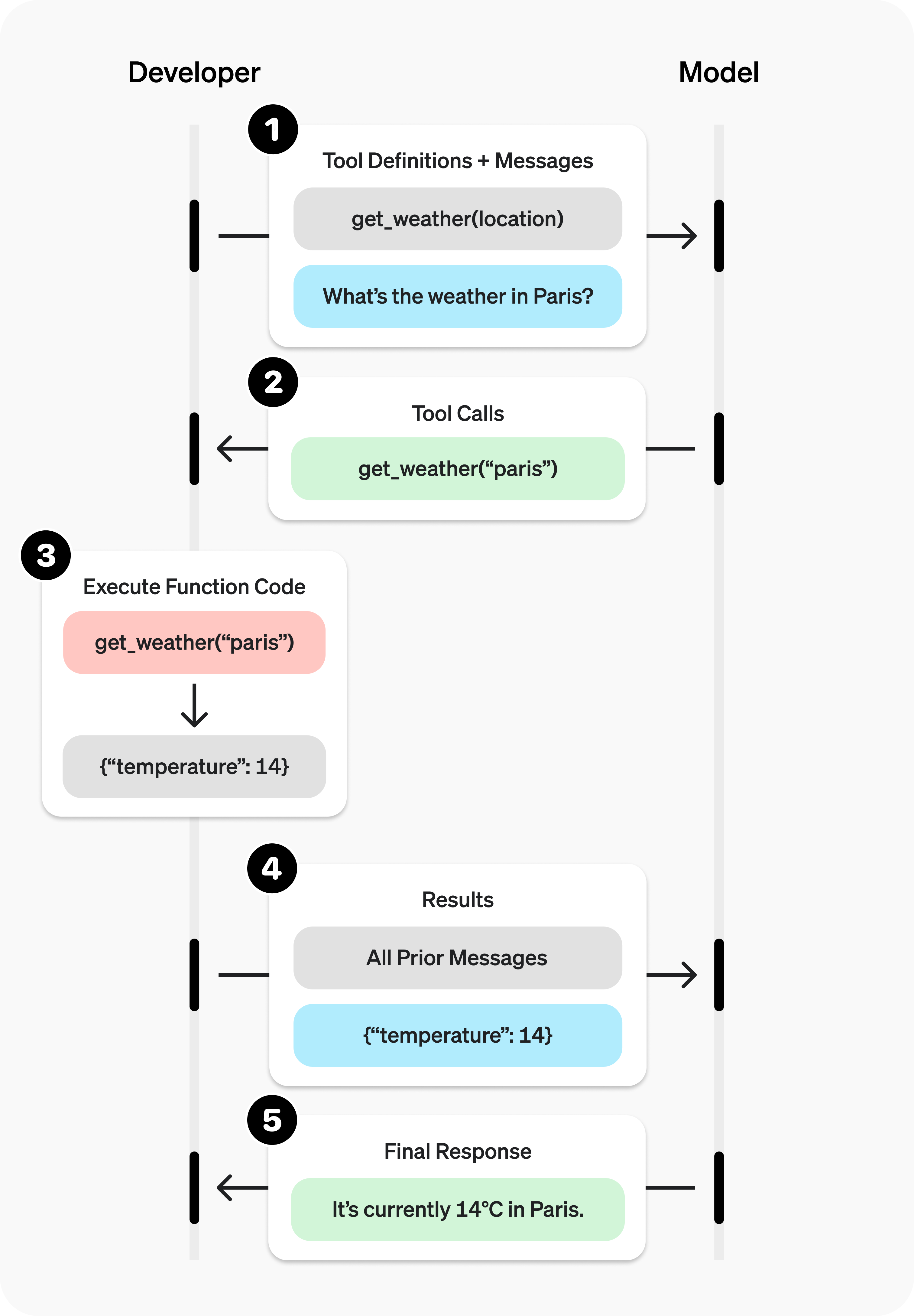
Tool calling is a multi-turn conversation between your application and the model via the ShuYou API. The tool calling flow has five main steps:
1. Send a request to the model, including the tools it can call
2. Receive tool calls from the model
3. Execute code on the application side using the tool call inputs
4. Send a second request to the model, including the tool outputs
5. Receive the final response from the model (or additional tool calls)
\
\
> Image source: OpenAI
### Tool calling example
Let’s look at a complete tool calling flow, using `get_horoscope` to fetch a daily horoscope for a zodiac sign.
A complete tool calling example:
```Python theme={null}
from openai import OpenAI
import json
client = OpenAI(
base_url="https://api.shuyou.ai/v1",
api_key="",
)
# 1. Define the list of callable tools for the model
tools = [
{
"type": "function",
"function": {
"name": "get_horoscope",
"description": "Get today's horoscope for a zodiac sign.",
"parameters": {
"type": "object",
"properties": {
"sign": {
"type": "string",
"description": "Zodiac sign name, e.g., Taurus or Aquarius",
},
},
"required": ["sign"],
},
},
},
]
# Create the message list; we'll append messages to it over time
input_list = [
{"role": "user", "content": "How's my horoscope? I'm an Aquarius."}
]
# 2. Prompt the model with the defined tools
response = client.chat.completions.create(
model="moonshotai/kimi-k2",
tools=tools,
messages=input_list,
)
# Save the function call output for subsequent requests
function_call = None
function_call_arguments = None
input_list.append({
"role": "assistant",
"content": response.choices[0].message.content,
"tool_calls": [tool_call.model_dump() for tool_call in response.choices[0].message.tool_calls] if response.choices[0].message.tool_calls else None,
})
for item in response.choices[0].message.tool_calls:
if item.type == "function":
function_call = item
function_call_arguments = json.loads(item.function.arguments)
def get_horoscope(sign):
return f"{sign}: Next Tuesday you'll meet a baby otter."
# 3. Execute the get_horoscope function logic
result = {"horoscope": get_horoscope(function_call_arguments["sign"])}
# 4. Provide the function call result to the model
input_list.append({
"role": "tool",
"tool_call_id": function_call.id,
"name": function_call.function.name,
"content": json.dumps(result),
})
print("Final input:")
print(json.dumps(input_list, indent=2, ensure_ascii=False))
response = client.chat.completions.create(
model="moonshotai/kimi-k2",
tools=tools,
messages=input_list,
)
# 5. The model should now be able to respond!
print("Final output:")
print(response.model_dump_json(indent=2))
print("\n" + response.choices[0].message.content)
```
```Typescript theme={null}
import OpenAI from "openai";
const openai = new OpenAI({
baseURL: 'https://api.shuyou.ai/v1',
apiKey: '',
});
// 1. Define the list of callable tools for the model
const tools: OpenAI.Chat.Completions.ChatCompletionTool[] = [
{
type: "function",
function: {
name: "get_horoscope",
description: "Get today's horoscope for a zodiac sign.",
parameters: {
type: "object",
properties: {
sign: {
type: "string",
description: "Zodiac sign name, e.g., Taurus or Aquarius",
},
},
required: ["sign"],
},
},
},
];
// Create the message list; we'll append messages to it over time
let input: OpenAI.Chat.Completions.ChatCompletionMessageParam[] = [
{ role: "user", content: "How's my horoscope? I'm an Aquarius." },
];
async function main() {
// 2. Use a model that supports tool calling
let response = await openai.chat.completions.create({
model: "moonshotai/kimi-k2",
tools,
messages: input,
});
// Save the function call output for subsequent requests
let functionCall: OpenAI.Chat.Completions.ChatCompletionMessageFunctionToolCall | undefined;
let functionCallArguments: Record | undefined;
input = input.concat(response.choices.map((c) => c.message));
response.choices.forEach((item) => {
if (item.message.tool_calls && item.message.tool_calls.length > 0) {
functionCall = item.message.tool_calls[0] as OpenAI.Chat.Completions.ChatCompletionMessageFunctionToolCall;
functionCallArguments = JSON.parse(functionCall.function.arguments) as Record;
}
});
// 3. Execute the get_horoscope function logic
function getHoroscope(sign: string) {
return sign + " Next Tuesday you'll meet a baby otter.";
}
if (!functionCall || !functionCallArguments) {
throw new Error("The model did not return a function call");
}
const result = { horoscope: getHoroscope(functionCallArguments.sign) };
// 4. Provide the function call result to the model
input.push({
role: 'tool',
tool_call_id: functionCall.id,
// @ts-expect-error must have name
name: functionCall.function.name,
content: JSON.stringify(result),
});
console.log("Final input:");
console.log(JSON.stringify(input, null, 2));
response = await openai.chat.completions.create({
model: "moonshotai/kimi-k2",
tools,
messages: input,
});
// 5. The model should now be able to respond!
console.log("Final output:");
console.log(JSON.stringify(response.choices.map(v => v.message), null, 2));
}
main();
```
Note: For reasoning models like GPT-5 or o4-mini, in the final call, you must pass the model-returned tool call content back to the LLM together with the tool call output so it can produce a summarized final answer.
### Defining a function tool (`function`)
Function tools can be configured via the `tools` parameter. A function tool is defined by its schema, which tells the model what the function does and what input parameters it expects. A function tool definition includes the following fields:
| Field | Description |
| -------------------- | ------------------------------------------------------------------------ |
| type | Must always be `function` |
| function | The tool object |
| function.name | Function name (e.g., `get_weather`) |
| function.description | Detailed information on when and how to use the function |
| function.parameters | JSON Schema defining the function input parameters |
| function.strict | Whether to enable strict schema adherence when generating function calls |
Below is the definition for a `get_weather` function tool:
```json theme={null}
{
"type": "function",
"function": {
"name": "get_weather",
"description": "Retrieve the current weather for a given location.",
"parameters": {
"type": "object",
"properties": {
"location": {
"type": "string",
"description": "City and country, for example: Bogotá, Colombia"
},
"units": {
"type": "string",
"enum": ["celsius", "fahrenheit"],
"description": "The unit for the returned temperature."
}
},
"required": ["location", "units"],
"additionalProperties": false
},
"strict": true
}
}
```
#### Token usage
Under the hood, `tools` counts toward the model’s context limit and is billed as prompt tokens. If you run into token limits, we recommend reducing the size and number of `tools`.
### Handling tool calls (Tool calling)
When the model calls a tool in `tools`, you must execute that tool and return the result. Since tool calling may include zero, one, or multiple calls, best practice is to assume there may be multiple.
### Response format
When the model needs to call tools, the response `finish_reason` is `"tool_calls"`, and `message` includes a `tool_calls` array:
```json theme={null}
{
"id": "chatcmpl_xxx",
"model": "openai/gpt-4.1-nano",
"choices": [
{
"index": 0,
"message": {
"role": "assistant",
"content": null,
"tool_calls": [
{
"id": "call_abc123",
"type": "function",
"function": {
"name": "get_weather",
"arguments": "{\"location\":\"北京\"}"
}
}
]
},
"finish_reason": "tool_calls"
}
]
}
```
Each call in the `tool_calls` array contains:
* `id`: a unique identifier used when submitting the function result later
* `type`: the tool `type`, typically `function` or `custom`
* `function`: the function object
* `name`: the function name
* `arguments`: JSON-encoded function arguments
Example `tool_calls` containing multiple tool calls:
```json title=" theme={null}
{
"id": "fc_12345xyz",
"type": "function",
"function": {
"name": "get_weather",
"arguments": "{\"location\":\"Paris, France\"}"
}
},
{
"id": "fc_67890abc",
"type": "function",
"function": {
"name": "get_weather",
"arguments": "{\"location\":\"Bogotá, Colombia\"}"
}
},
{
"id": "fc_99999def",
"type": "function",
"function": {
"name": "send_email",
"arguments": "{\"to\":\"bob@email.com\",\"body\":\"Hi bob\"}"
}
}
"
```
Execute tool calls and append results
```Python theme={null}
for choice in response.choices:
for tool_call in choice.message.tool_calls or []:
if tool_call.type != "function":
continue
name = tool_call.function.name
args = json.loads(tool_call.function.arguments)
result = call_function(name, args)
input_list.append({
"role": "tool",
"name": name,
"tool_call_id": tool_call.id,
"content": str(result)
})
```
```Typescript theme={null}
for (const choice of response.choices) {
for (const toolCall of choice.tool_calls) {
if (toolCall.type !== "function") {
continue;
}
const name = toolCall.function.name;
const args = JSON.parse(toolCall.function.arguments);
const result = callFunction(name, args);
input.push({
role: "tool",
name: name,
tool_call_id: toolCall.id,
content: result.toString()
});
}
}
```
In the example above, we assume a `callFunction` router for each call. Here’s one possible implementation:
Execute function calls and append results
```Python theme={null}
def call_function(name, args):
if name == "get_weather":
return get_weather(**args)
if name == "send_email":
return send_email(**args)
```
```Typescript theme={null}
const callFunction = async (name: string, args: unknown) => {
if (name === "get_weather") {
return getWeather(args.latitude, args.longitude);
}
if (name === "send_email") {
return sendEmail(args.to, args.body);
}
};
```
#### Formatting results
Results must be strings, and the string content is up to you (JSON, error codes, plain text, etc.). The model will interpret the string as needed.
If your tool call has no return value (e.g., `send_email`), simply return a string indicating success or failure (e.g., `"success"`).
#### Merging results into the final response
After appending results to your `input`, you can send them back to the model to get the final response.
Send results back to the model
```Python theme={null}
response = client.chat.completions.create(
model="moonshotai/kimi-k2",
messages=input_messages,
tools=tools,
)
```
```Typescript theme={null}
const response = await openai.chat.completions.create({
model: "moonshotai/kimi-k2",
messages: input,
tools,
});
```
Final response
```json theme={null}
"Paris is about 15°C, Bogotá is about 18°C, and I've sent that email to Bob."
```
### Other configuration
#### Controlling tool calling behavior (`tool_choice`)
By default, the model decides when and how many tools to call. You can control tool calling behavior using the `tool_choice` parameter.
1. **Auto:** (*default*) Call zero, one, or multiple tools. `tool_choice: "auto"`
2. **Required:** Call one or more tools. `tool_choice: "required"`
**When to use (allowed\_tools)**
If you want the model to use only a subset of the tool list in a given request—without modifying the tool list you pass in, to maximize prompt caching—you can configure `allowed_tools`.
```json theme={null}
"tool_choice": {
"type": "allowed_tools",
"mode": "auto",
"tools": [
{ "type": "function", "function": { "name": "get_weather" } },
{ "type": "function", "function": { "name": "get_time" } }
]
}
```
You can also set `tool_choice` to `"none"` to force the model not to call any tools.
### Streaming
Streaming tool calling is very similar to streaming normal responses: set `stream` to `true` and receive a stream of `event`s.
Streaming tool calls:
```Python theme={null}
from openai import OpenAI
client = OpenAI(
base_url="https://api.shuyou.ai/v1",
api_key="",
)
tools = [{
"type": "function",
"function": {
"name": "get_weather",
"description": "Get the current temperature for a given location.",
"parameters": {
"type": "object",
"properties": {
"location": {
"type": "string",
"description": "City and country, e.g. Bogotá, Colombia"
}
},
"required": [
"location"
],
"additionalProperties": False
}
}
}]
stream = client.chat.completions.create(
model="moonshotai/kimi-k2",
messages=[{"role": "user", "content": "What's the weather like in Paris today?"}],
tools=tools,
stream=True
)
for event in stream:
print(event.choices[0].delta.model_dump_json())
```
```Typescript theme={null}
import { OpenAI } from "openai";
const openai = new OpenAI({
baseURL: 'https://api.shuyou.ai/v1',
apiKey: '',
});
const tools: OpenAI.Chat.Completions.ChatCompletionTool[] = [{
type: "function",
function: {
name: "get_weather",
description: "Get the current temperature (Celsius) for the provided coordinates.",
parameters: {
type: "object",
properties: {
latitude: { type: "number" },
longitude: { type: "number" }
},
required: ["latitude", "longitude"],
additionalProperties: false
},
strict: true,
},
}];
async function main() {
const stream = await openai.chat.completions.create({
model: "moonshotai/kimi-k2",
messages: [{ role: "user", content: "What's the weather like in Paris today?" }],
tools,
stream: true,
});
for await (const event of stream) {
console.log(JSON.stringify(event.choices[0].delta));
}
}
main()
```
Output events
```json theme={null}
{"content":"I need","role":"assistant"}
{"content":"Paris","role":"assistant"}
{"content":"'s","role":"assistant"}
{"content":"coordinates","role":"assistant"}
{"content":"in order","role":"assistant"}
{"content":"to retrieve","role":"assistant"}
{"content":"weather","role":"assistant"}
{"content":"information","role":"assistant"}
{"content":".","role":"assistant"}
{"content":"Paris","role":"assistant"}
{"content":"'s","role":"assistant"}
{"content":"latitude","role":"assistant"}
{"content":"is about","role":"assistant"}
{"content":"48","role":"assistant"}
{"content":".","role":"assistant"}
{"content":"856","role":"assistant"}
{"content":"6","role":"assistant"}
{"content":",","role":"assistant"}
{"content":"and","role":"assistant"}
{"content":"longitude","role":"assistant"}
{"content":"is","role":"assistant"}
{"content":"2","role":"assistant"}
{"content":".","role":"assistant"}
{"content":"352","role":"assistant"}
{"content":"2","role":"assistant"}
{"content":".","role":"assistant"}
{"content":"Let me","role":"assistant"}
{"content":"look up","role":"assistant"}
{"content":"Paris","role":"assistant"}
{"content":"'s","role":"assistant"}
{"content":"weather","role":"assistant"}
{"content":"for today","role":"assistant"}
{"content":".","role":"assistant"}
{"content":"","role":"assistant","tool_calls":[{"index":0,"id":"get_weather:0","function":{"arguments":"","name":"get_weather"},"type":"function"}]}
{"content":"","role":"assistant","tool_calls":[{"index":0,"function":{"arguments":"{\""}}]}
{"content":"","role":"assistant","tool_calls":[{"index":0,"function":{"arguments":"latitude"}}]}
{"content":"","role":"assistant","tool_calls":[{"index":0,"function":{"arguments":"\":"}}]}
{"content":"","role":"assistant","tool_calls":[{"index":0,"function":{"arguments":" "}}]}
{"content":"","role":"assistant","tool_calls":[{"index":0,"function":{"arguments":"48"}}]}
{"content":"","role":"assistant","tool_calls":[{"index":0,"function":{"arguments":"."}}]}
{"content":"","role":"assistant","tool_calls":[{"index":0,"function":{"arguments":"856"}}]}
{"content":"","role":"assistant","tool_calls":[{"index":0,"function":{"arguments":"6"}}]}
{"content":"","role":"assistant","tool_calls":[{"index":0,"function":{"arguments":","}}]}
{"content":"","role":"assistant","tool_calls":[{"index":0,"function":{"arguments":" \""}}]}
{"content":"","role":"assistant","tool_calls":[{"index":0,"function":{"arguments":"longitude"}}]}
{"content":"","role":"assistant","tool_calls":[{"index":0,"function":{"arguments":"\":"}}]}
{"content":"","role":"assistant","tool_calls":[{"index":0,"function":{"arguments":" "}}]}
{"content":"","role":"assistant","tool_calls":[{"index":0,"function":{"arguments":"2"}}]}
{"content":"","role":"assistant","tool_calls":[{"index":0,"function":{"arguments":"."}}]}
{"content":"","role":"assistant","tool_calls":[{"index":0,"function":{"arguments":"352"}}]}
{"content":"","role":"assistant","tool_calls":[{"index":0,"function":{"arguments":"2"}}]}
{"content":"","role":"assistant","tool_calls":[{"index":0,"function":{"arguments":"}"}}]}
{"content":"","role":"assistant"}
```
When the model calls one or more tools, an `event` will be emitted for each tool call where `tool_calls.type` is not empty:
```json theme={null}
{
"content": "",
"role": "assistant",
"tool_calls": [
{
"index": 0,
"id": "get_weather:0",
"function": { "arguments": "", "name": "get_weather" },
"type": "function"
}
]
}
```
Below is a snippet showing how to aggregate `delta` values into the final `tool_call` object.
Accumulate `tool_call` content
```Python theme={null}
final_tool_calls = {}
for event in stream:
delta = event.choices[0].delta
if delta.tool_calls and len(delta.tool_calls) > 0:
tool_call = delta.tool_calls[0]
if tool_call.type == "function":
final_tool_calls[tool_call.index] = tool_call
else:
final_tool_calls[tool_call.index].function.arguments += tool_call.function.arguments
print("Final tool calls:")
for index, tool_call in final_tool_calls.items():
print(f"Tool Call {index}:")
print(tool_call.model_dump_json(indent=2))
```
```Typescript theme={null}
const finalToolCalls: OpenAI.Chat.Completions.ChatCompletionMessageFunctionToolCall[] = [];
for await (const event of stream) {
const delta = event.choices[0].delta;
if (delta.tool_calls && delta.tool_calls.length > 0) {
const toolCall = delta.tool_calls[0] as OpenAI.Chat.Completions.ChatCompletionMessageFunctionToolCall & {index: number};
if (toolCall.type === "function") {
finalToolCalls[toolCall.index] = toolCall;
} else {
finalToolCalls[toolCall.index].function.arguments += toolCall.function.arguments;
}
}
}
console.log("Final tool calls:");
console.log(JSON.stringify(finalToolCalls, null, 2));
```
Accumulated `final_tool_calls[0]`
```json theme={null}
{
"index": 0,
"id": "get_weather:0",
"function": {
"arguments": "{\"location\": \"巴黎, 法国\"}",
"name": "get_weather"
},
"type": "function"
}
```
## OpenAI Responses API
The OpenAI Responses API provides a more modern tool calling interface. Tool definitions are similar to the Chat Completion API, but the response structure differs.
### Tool definition
In the Responses API, tool definitions use the `tools` parameter and support function tools, built-in tools, and MCP tools:
```json theme={null}
{
"tools": [
{
"type": "function",
"name": "get_weather",
"description": "Get the current weather for a given location",
"parameters": {
"type": "object",
"properties": {
"location": {
"type": "string",
"description": "City name, e.g., Beijing"
}
},
"required": ["location"]
}
}
]
}
```
### Complete example
```python title="Python" theme={null}
from openai import OpenAI
import json
client = OpenAI(
base_url="https://api.shuyou.ai/v1",
api_key="",
)
# Define tools
tools = [
{
"type": "function",
"name": "get_weather",
"description": "Get the current weather for a given location",
"parameters": {
"type": "object",
"properties": {
"location": {
"type": "string",
"description": "City name"
}
},
"required": ["location"]
}
}
]
# 1. Send request
response = client.responses.create(
model="openai/gpt-5", # [!code highlight]
input="What's the weather like in Beijing today?",
tools=tools
)
# 2. Check whether there are tool calls
function_calls = []
for item in response.output:
if item.type == "function_call":
function_calls.append(item)
if function_calls:
# 3. Execute tool calls
def get_weather(location):
return {"temperature": "25°C", "condition": "Clear"}
tool_outputs = []
for call in function_calls:
args = json.loads(call.arguments)
result = get_weather(args["location"])
tool_outputs.append({
"type": "function_call_output",
"call_id": call.call_id,
"output": json.dumps(result, ensure_ascii=False)
})
# 4. Send tool results back to the model
final_response = client.responses.create(
model="openai/gpt-5",
input=tool_outputs,
previous_response_id=response.id
)
# Extract final answer
for item in final_response.output:
if item.type == "message":
for content in item.content:
if content.type == "output_text":
print(content.text)
```
```typescript title="TypeScript" theme={null}
import OpenAI from "openai";
const client = new OpenAI({
baseURL: "https://api.shuyou.ai/v1",
apiKey: "",
});
// Define tools
const tools = [
{
type: "function" as const,
name: "get_weather",
description: "Get the current weather for a given location",
parameters: {
type: "object",
properties: {
location: {
type: "string",
description: "City name",
},
},
required: ["location"],
},
},
];
async function main() {
// 1. Send request
const response = await client.responses.create({
model: "openai/gpt-5", // [!code highlight]
input: "What's the weather like in Beijing today?",
tools,
});
// 2. Check whether there are tool calls
const functionCalls = response.output.filter(
(item) => item.type === "function_call",
);
if (functionCalls.length > 0) {
// 3. Execute tool calls
function getWeather(location: string) {
return { temperature: "25°C", condition: "Clear" };
}
const toolOutputs = functionCalls.map((call) => ({
type: "function_call_output" as const,
call_id: call.call_id,
output: JSON.stringify(getWeather(JSON.parse(call.arguments).location)),
}));
// 4. Send tool results back to the model
const finalResponse = await client.responses.create({
model: "openai/gpt-5",
input: toolOutputs,
previous_response_id: response.id,
});
// Extract final answer
for (const item of finalResponse.output) {
if (item.type === "message") {
for (const content of item.content) {
if (content.type === "output_text") {
console.log(content.text);
}
}
}
}
}
}
main();
```
```bash title="cURL" theme={null}
# 1. First request - send tool definitions
curl https://api.shuyou.ai/v1/responses \
-H "Content-Type: application/json" \
-H "Authorization: Bearer $ShuYou_API_KEY" \
-d '{
"model": "openai/gpt-5",
"input": "北京今天的天气怎么样?",
"tools": [
{
"type": "function",
"name": "get_weather",
"description": "获取给定位置的当前天气",
"parameters": {
"type": "object",
"properties": {
"location": {
"type": "string",
"description": "城市名称"
}
},
"required": ["location"]
}
}
]
}'
# 2. Second request - send tool execution results (use the response id returned above)
curl https://api.shuyou.ai/v1/responses \
-H "Content-Type: application/json" \
-H "Authorization: Bearer $ShuYou_API_KEY" \
-d '{
"model": "openai/gpt-5",
"input": [
{
"type": "function_call_output",
"call_id": "call_xxx",
"output": "{\"temperature\": \"25°C\", \"condition\": \"晴朗\"}"
}
],
"previous_response_id": "resp_xxx"
}'
```
### Response format
When the model needs to call tools, the response `output` array will include an item of type `function_call`:
```json theme={null}
{
"id": "resp_xxx",
"output": [
{
"type": "function_call",
"call_id": "call_abc123",
"name": "get_weather",
"arguments": "{\"location\": \"北京\"}"
}
]
}
```
### `tool_choice` parameter
Similar to the Chat Completion API, the Responses API also supports `tool_choice`:
* `"auto"`: (default) the model decides whether to call tools
* `"required"`: force the model to call at least one tool
* `"none"`: prohibit tool calls
* `\{"type": "function", "name": "xxx"\}`: force calling a specific tool
## Anthropic Messages API
Anthropic Claude models support tool calling via the `tools` parameter. Tool definitions use the `input_schema` field instead of `parameters`.
### Tool definition
Anthropic tool definition format:
```json theme={null}
{
"tools": [
{
"name": "get_weather",
"description": "Get the current weather for a given location",
"input_schema": {
"type": "object",
"properties": {
"location": {
"type": "string",
"description": "City name, e.g., Beijing"
}
},
"required": ["location"]
}
}
]
}
```
Anthropic supports `strict: true` to enable strict mode, ensuring tool call arguments always conform to the schema.
### Complete example
```python title="Python" theme={null}
import anthropic
import json
client = anthropic.Anthropic(
api_key="", # [!code highlight]
base_url="https://api.shuyou.ai" # [!code highlight]
)
# Define tools
tools = [
{
"name": "get_weather",
"description": "Get the current weather for a given location. Call this tool when the user asks about the weather.",
"input_schema": {
"type": "object",
"properties": {
"location": {
"type": "string",
"description": "City name, e.g., Beijing or Shanghai"
}
},
"required": ["location"]
}
}
]
# 1. Send request
message = client.messages.create(
model="anthropic/claude-sonnet-4.5", # [!code highlight]
max_tokens=1024,
tools=tools,
messages=[
{"role": "user", "content": "What's the weather like in Beijing today?"}
]
)
# 2. Check whether a tool call is needed
if message.stop_reason == "tool_use":
# Extract tool call
tool_use_block = None
for block in message.content:
if block.type == "tool_use":
tool_use_block = block
break
if tool_use_block:
# 3. Execute tool call
def get_weather(location):
return {"temperature": "25°C", "condition": "Clear", "humidity": "40%"}
result = get_weather(tool_use_block.input["location"])
# 4. Send tool results back to the model
final_message = client.messages.create(
model="anthropic/claude-sonnet-4.5",
max_tokens=1024,
tools=tools,
messages=[
{"role": "user", "content": "What's the weather like in Beijing today?"},
{"role": "assistant", "content": message.content},
{
"role": "user",
"content": [
{
"type": "tool_result",
"tool_use_id": tool_use_block.id,
"content": json.dumps(result, ensure_ascii=False)
}
]
}
]
)
# Extract final answer
for block in final_message.content:
if hasattr(block, "text"):
print(block.text)
else:
# Output answer directly
for block in message.content:
if hasattr(block, "text"):
print(block.text)
```
```typescript title="TypeScript" theme={null}
import Anthropic from "@anthropic-ai/sdk";
const client = new Anthropic({
apiKey: "", // [!code highlight]
baseURL: "https://api.shuyou.ai", // [!code highlight]
});
// Define tools
const tools: Anthropic.Messages.Tool[] = [
{
name: "get_weather",
description: "Get the current weather for a given location. Call this tool when the user asks about the weather.",
input_schema: {
type: "object" as const,
properties: {
location: {
type: "string",
description: "City name, e.g., Beijing or Shanghai",
},
},
required: ["location"],
},
},
];
async function main() {
// 1. Send request
const message = await client.messages.create({
model: "anthropic/claude-sonnet-4.5", // [!code highlight]
max_tokens: 1024,
tools,
messages: [{ role: "user", content: "What's the weather like in Beijing today?" }],
});
// 2. Check whether a tool call is needed
if (message.stop_reason === "tool_use") {
const toolUseBlock = message.content.find(
(block) => block.type === "tool_use",
);
if (toolUseBlock && toolUseBlock.type === "tool_use") {
// 3. Execute tool call
function getWeather(location: string) {
return { temperature: "25°C", condition: "Clear", humidity: "40%" };
}
const result = getWeather((toolUseBlock.input as any).location);
// 4. Send tool results back to the model
const finalMessage = await client.messages.create({
model: "anthropic/claude-sonnet-4.5",
max_tokens: 1024,
tools,
messages: [
{ role: "user", content: "What's the weather like in Beijing today?" },
{ role: "assistant", content: message.content },
{
role: "user",
content: [
{
type: "tool_result",
tool_use_id: toolUseBlock.id,
content: JSON.stringify(result),
},
],
},
],
});
// Extract final answer
for (const block of finalMessage.content) {
if (block.type === "text") {
console.log(block.text);
}
}
}
} else {
// Output answer directly
for (const block of message.content) {
if (block.type === "text") {
console.log(block.text);
}
}
}
}
main();
```
```bash title="cURL" theme={null}
# 1. First request - send tool definitions
curl https://api.shuyou.ai/v1/messages \
-H "x-api-key: $ShuYou_API_KEY" \
-H "anthropic-version: 2023-06-01" \
-H "Content-Type: application/json" \
-d '{
"model": "anthropic/claude-sonnet-4.5",
"max_tokens": 1024,
"tools": [
{
"name": "get_weather",
"description": "获取给定位置的当前天气",
"input_schema": {
"type": "object",
"properties": {
"location": {
"type": "string",
"description": "城市名称"
}
},
"required": ["location"]
}
}
],
"messages": [
{"role": "user", "content": "北京今天的天气怎么样?"}
]
}'
# 2. Second request - send tool execution results
curl https://api.shuyou.ai/v1/messages \
-H "x-api-key: $ShuYou_API_KEY" \
-H "anthropic-version: 2023-06-01" \
-H "Content-Type: application/json" \
-d '{
"model": "anthropic/claude-sonnet-4.5",
"max_tokens": 1024,
"tools": [
{
"name": "get_weather",
"description": "获取给定位置的当前天气",
"input_schema": {
"type": "object",
"properties": {
"location": {"type": "string", "description": "城市名称"}
},
"required": ["location"]
}
}
],
"messages": [
{"role": "user", "content": "北京今天的天气怎么样?"},
{
"role": "assistant",
"content": [
{
"type": "tool_use",
"id": "toolu_xxx",
"name": "get_weather",
"input": {"location": "北京"}
}
]
},
{
"role": "user",
"content": [
{
"type": "tool_result",
"tool_use_id": "toolu_xxx",
"content": "{\"temperature\": \"25°C\", \"condition\": \"晴朗\"}"
}
]
}
]
}'
```
### Response format
When Claude needs to call a tool, `stop_reason` is `"tool_use"`, and the `content` array includes blocks of type `tool_use`:
```json theme={null}
{
"id": "msg_abc123",
"model": "anthropic/claude-sonnet-4.5",
"stop_reason": "tool_use",
"content": [
{
"type": "tool_use",
"id": "toolu_abc123",
"name": "get_weather",
"input": {
"location": "北京"
}
}
]
}
```
Before a tool call, Claude may return a `text` block (e.g., “Let me check the weather”), or it may return a `tool_use` block directly, depending on the model’s judgment.
### `tool_choice` parameter
Anthropic’s `tool_choice` parameter supports:
| Value | Description |
| ----------------------------------- | --------------------------------------------- |
| `\{"type": "auto"\}` | (default) Model decides whether to call tools |
| `\{"type": "any"\}` | Force the model to call at least one tool |
| `\{"type": "tool", "name": "xxx"\}` | Force calling the tool with the given name |
| `\{"type": "none"\}` | Prohibit tool calls |
### Parallel tool calls
Claude can return multiple tool calls in a single response:
```json theme={null}
{
"content": [
{
"type": "tool_use",
"id": "toolu_1",
"name": "get_weather",
"input": { "location": "北京" }
},
{
"type": "tool_use",
"id": "toolu_2",
"name": "get_weather",
"input": { "location": "上海" }
}
]
}
```
When returning results, you must provide a matching `tool_result` for each tool call:
```json theme={null}
{
"role": "user",
"content": [
{
"type": "tool_result",
"tool_use_id": "toolu_1",
"content": "{\"temperature\": \"25°C\"}"
},
{
"type": "tool_result",
"tool_use_id": "toolu_2",
"content": "{\"temperature\": \"28°C\"}"
}
]
}
```
## Google Vertex AI API
Google Vertex AI’s Gemini models support function calling via the `tools` parameter.
### Tool definition
Vertex AI uses `FunctionDeclaration` to define tools:
```python theme={null}
from google.genai import types
tools = types.Tool(
function_declarations=[
types.FunctionDeclaration(
name="get_weather",
description="获取给定位置的当前天气",
parameters={
"type": "object",
"properties": {
"location": {
"type": "string",
"description": "城市名称"
}
},
"required": ["location"]
}
)
]
)
```
### Complete example
```python title="Python" theme={null}
from google import genai
from google.genai import types
import json
client = genai.Client(
api_key="", # [!code highlight]
vertexai=True,
http_options=types.HttpOptions(
api_version='v1',
base_url='https://api.shuyou.ai' # [!code highlight]
),
)
# Define tools
get_weather_func = types.FunctionDeclaration(
name="get_weather",
description="Get the current weather for a given location. Call this tool when the user asks about the weather.",
parameters={
"type": "object",
"properties": {
"location": {
"type": "string",
"description": "City name, e.g., Beijing or Shanghai"
}
},
"required": ["location"]
}
)
tools = types.Tool(function_declarations=[get_weather_func])
# 1. Send request
response = client.models.generate_content(
model="google/gemini-2.5-pro", # [!code highlight]
contents="What's the weather like in Beijing today?",
config=types.GenerateContentConfig(
tools=[tools]
)
)
# 2. Check whether there are function calls
if response.function_calls:
function_call = response.function_calls[0]
# 3. Execute function call
def get_weather(location):
return {"temperature": "25°C", "condition": "Clear", "humidity": "40%"}
result = get_weather(function_call.args["location"])
# 4. Build the conversation history including the function result
contents = [
types.Content(role="user", parts=[types.Part(text="What's the weather like in Beijing today?")]),
response.candidates[0].content, # The model's function-call response
types.Content(
role="user",
parts=[
types.Part.from_function_response(
name=function_call.name,
response=result
)
]
)
]
# 5. Send final request
final_response = client.models.generate_content(
model="google/gemini-2.5-pro",
contents=contents,
config=types.GenerateContentConfig(
tools=[tools]
)
)
print(final_response.text)
else:
print(response.text)
```
```typescript title="TypeScript" theme={null}
import { GoogleGenAI } from "@google/genai";
const client = new GoogleGenAI({
apiKey: "", // [!code highlight]
vertexai: true,
httpOptions: {
baseUrl: "https://api.shuyou.ai", // [!code highlight]
apiVersion: "v1",
},
});
// Define tools
const tools = {
functionDeclarations: [
{
name: "get_weather",
description: "Get the current weather for a given location",
parameters: {
type: "object",
properties: {
location: {
type: "string",
description: "City name",
},
},
required: ["location"],
},
},
],
};
async function main() {
// 1. Send request
const response = await client.models.generateContent({
model: "google/gemini-2.5-pro", // [!code highlight]
contents: "What's the weather like in Beijing today?",
generationConfig: {
tools: [tools],
},
});
// 2. Check whether there are function calls
const functionCalls = response.functionCalls;
if (functionCalls && functionCalls.length > 0) {
const call = functionCalls[0];
// 3. Execute function call
function getWeather(location: string) {
return { temperature: "25°C", condition: "Clear", humidity: "40%" };
}
const result = getWeather(call.args.location);
// 4. Build and send conversation history including the function result
const finalResponse = await client.models.generateContent({
model: "google/gemini-2.5-pro",
contents: [
{ role: "user", parts: [{ text: "What's the weather like in Beijing today?" }] },
response.candidates[0].content,
{
role: "user",
parts: [
{
functionResponse: {
name: call.name,
response: result,
},
},
],
},
],
generationConfig: {
tools: [tools],
},
});
console.log(finalResponse.text);
} else {
console.log(response.text);
}
}
main();
```
### Response format
When Gemini needs to call a function, the response includes a `functionCall` section:
```json theme={null}
{
"candidates": [
{
"content": {
"role": "model",
"parts": [
{
"functionCall": {
"name": "get_weather",
"args": {
"location": "北京"
}
}
}
]
}
}
]
}
```
### Function calling modes
Vertex AI supports controlling function calling behavior via `functionCallingConfig`:
| Mode | Description |
| ----------- | ------------------------------------------------------------------------------------------------ |
| `AUTO` | (default) Model decides whether to return text or call a function |
| `ANY` | Force the model to call a function; can restrict callable functions via `allowed_function_names` |
| `NONE` | Disable function calling |
| `VALIDATED` | (preview) Ensure function call arguments conform to the schema |
```python theme={null}
config = types.GenerateContentConfig(
tools=[tools],
tool_config=types.ToolConfig(
function_calling_config=types.FunctionCallingConfig(
mode=types.FunctionCallingConfigMode.ANY,
allowed_function_names=["get_weather"]
)
)
)
```
### Parallel function calls
Gemini can return multiple function calls in a single response:
```json theme={null}
{
"candidates": [
{
"content": {
"parts": [
{
"functionCall": {
"name": "get_weather",
"args": { "location": "北京" }
}
},
{
"functionCall": {
"name": "get_weather",
"args": { "location": "上海" }
}
}
]
}
}
]
}
```
When returning results, you must send all function responses together:
```python theme={null}
contents.append(
types.Content(
role="user",
parts=[
types.Part.from_function_response(name="get_weather", response=result1),
types.Part.from_function_response(name="get_weather", response=result2)
]
)
)
```
## Protocol comparison
| Feature | Chat Completion | Responses API | Anthropic Messages | Vertex AI |
| -------------------- | --------------- | ---------------------- | ------------------ | ----------------------- |
| Tool parameter name | `tools` | `tools` | `tools` | `tools` |
| Schema field | `parameters` | `parameters` | `input_schema` | `parameters` |
| Tool call identifier | `tool_calls` | `function_call` | `tool_use` | `functionCall` |
| Result field | `tool` role | `function_call_output` | `tool_result` | `functionResponse` |
| Parallel calls | ✅ | ✅ | ✅ | ✅ |
| Forced calling | `tool_choice` | `tool_choice` | `tool_choice` | `functionCallingConfig` |
| Strict mode | `strict: true` | ✅ | `strict: true` | `VALIDATED` mode |
| Streaming support | ✅ | ✅ | ✅ | ✅ |