

Tool Calling
Give models new capabilities and data access so they can follow instructions and respond to prompts. Tool calling (also known as function calling) provides LLMs with a powerful and flexible way to interface with external systems and access data beyond their training set. This guide shows how to connect a model to the data and actions provided by your application. ShuYou supports tool calling across multiple API protocols:- OpenAI Chat Completion API: Use the
toolsandtool_choiceparameters - OpenAI Responses API: Use the
toolsparameter; responses include thefunction_calltype - Anthropic Messages API: Use the
toolsparameter; tool definitions useinput_schema - Google Vertex AI API: Define tools with
FunctionDeclaration
OpenAI Chat Completion API
How it works
Let’s first align on a few key terms related to tool calling. Once we share the same vocabulary, we’ll walk through practical examples showing how to implement it.1. Tools - capabilities you provide to the model
A tool is a capability you expose to the model. When the model generates a response to a prompt, it may decide it needs data or functionality from a tool in order to follow the prompt’s instructions. You can provide the model access to tools such as:- Get today’s weather for a location
- Retrieve account details for a given user ID
- Issue a refund for a missing order
get_weather tool that takes location as a parameter.
2. Tool Call - the model’s request to use a tool
A function call or tool call is a special kind of response from the model. After inspecting the prompt, the model determines that it needs to call one of the tools you provided in order to follow the instructions in the prompt. If the model receives a prompt like “What’s the weather in Paris?” in an API request, it can respond with a tool call to theget_weather tool, passing Paris as the location argument.
3. Tool Call Output - the output you generate for the model
A function call output or tool call output is the response generated by your tool based on the model’s tool call inputs. Tool call outputs can be structured JSON or plain text, and should include a reference to the specific model tool call (referenced viatool_call_id in later examples).
Continuing our weather example:
- The model has access to a
get_weathertool that takeslocationas a parameter. - In response to a prompt like “What’s the weather in Paris?”, the model returns a tool call containing
location: Paris. - Your tool call output might be JSON like
\{"temperature": "25", "unit": "C"\}, indicating the current temperature is 25 degrees.
4. Function tool (function) vs. Tools
- A function (
function) is a specific type of tool defined by a JSON Schema. A function definition lets the model pass data to your application, where your code can access data or execute the action the model suggests. - In addition to function tools, there are custom tools that can handle free-form text input and output.
Tool calling flow
Tool calling is a multi-turn conversation between your application and the model via the ShuYou API. The tool calling flow has five main steps:- Send a request to the model, including the tools it can call
- Receive tool calls from the model
- Execute code on the application side using the tool call inputs
- Send a second request to the model, including the tool outputs
- Receive the final response from the model (or additional tool calls)
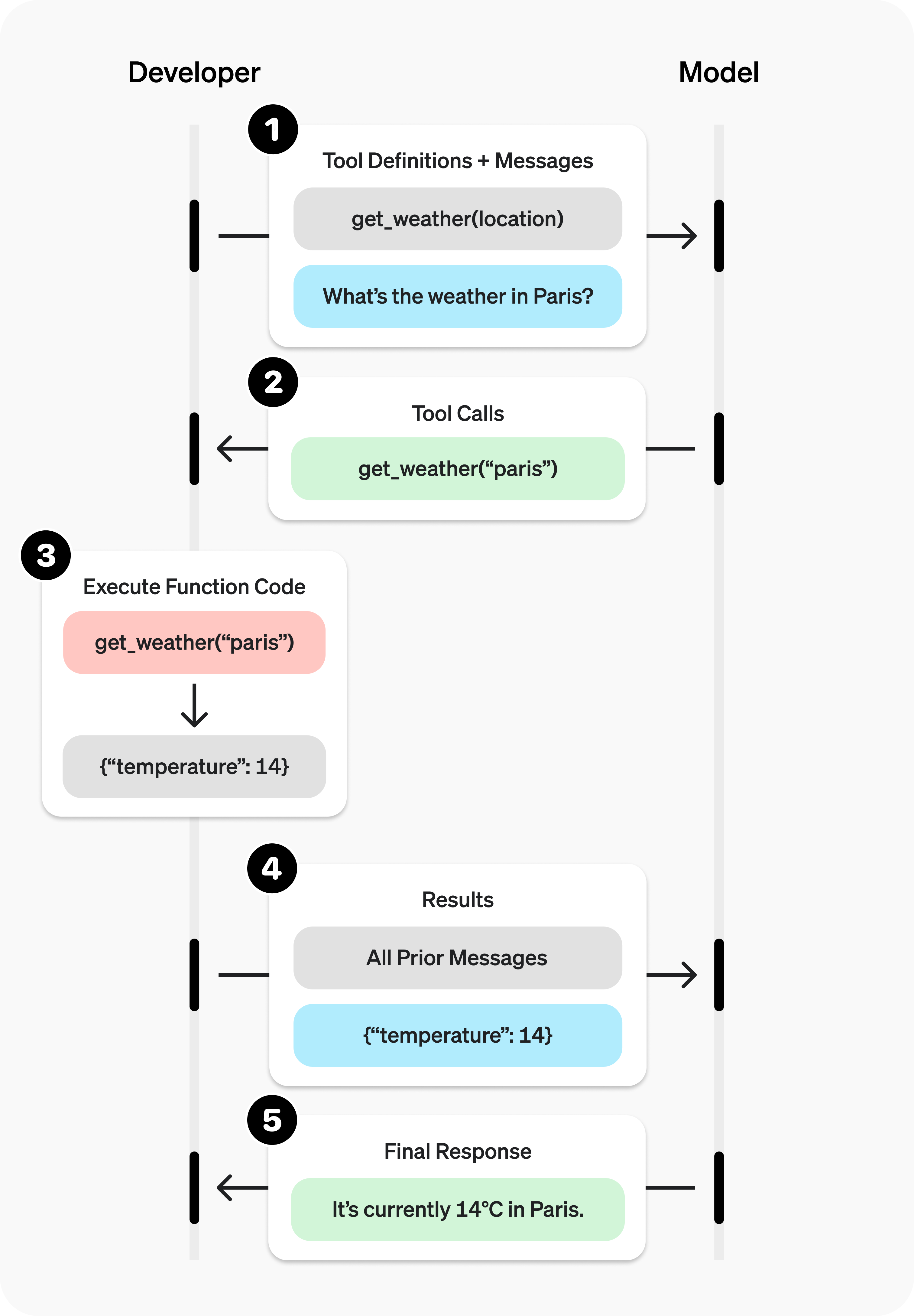 </div>
Image source: OpenAI
Tool calling example
Let’s look at a complete tool calling flow, usingget_horoscope to fetch a daily horoscope for a zodiac sign.
A complete tool calling example:
Defining a function tool (function)
Function tools can be configured via the tools parameter. A function tool is defined by its schema, which tells the model what the function does and what input parameters it expects. A function tool definition includes the following fields:
Below is the definition for a
get_weather function tool:
Token usage
Under the hood,tools counts toward the model’s context limit and is billed as prompt tokens. If you run into token limits, we recommend reducing the size and number of tools.
Handling tool calls (Tool calling)
When the model calls a tool intools, you must execute that tool and return the result. Since tool calling may include zero, one, or multiple calls, best practice is to assume there may be multiple.
Response format
When the model needs to call tools, the responsefinish_reason is "tool_calls", and message includes a tool_calls array:
tool_calls array contains:
id: a unique identifier used when submitting the function result latertype: the tooltype, typicallyfunctionorcustomfunction: the function objectname: the function namearguments: JSON-encoded function arguments
tool_calls containing multiple tool calls:
"
callFunction router for each call. Here’s one possible implementation:
Execute function calls and append results
Formatting results
Results must be strings, and the string content is up to you (JSON, error codes, plain text, etc.). The model will interpret the string as needed. If your tool call has no return value (e.g.,send_email), simply return a string indicating success or failure (e.g., "success").
Merging results into the final response
After appending results to yourinput, you can send them back to the model to get the final response.
Send results back to the model
Other configuration
Controlling tool calling behavior (tool_choice)
By default, the model decides when and how many tools to call. You can control tool calling behavior using the tool_choice parameter.
- Auto: (default) Call zero, one, or multiple tools.
tool_choice: "auto" - Required: Call one or more tools.
tool_choice: "required"
allowed_tools.
tool_choice to "none" to force the model not to call any tools.
Streaming
Streaming tool calling is very similar to streaming normal responses: setstream to true and receive a stream of events.
Streaming tool calls:
event will be emitted for each tool call where tool_calls.type is not empty:
delta values into the final tool_call object.
Accumulate tool_call content
final_tool_calls[0]
OpenAI Responses API
The OpenAI Responses API provides a more modern tool calling interface. Tool definitions are similar to the Chat Completion API, but the response structure differs.Tool definition
In the Responses API, tool definitions use thetools parameter and support function tools, built-in tools, and MCP tools:
Complete example
Python
TypeScript
cURL
Response format
When the model needs to call tools, the responseoutput array will include an item of type function_call:
tool_choice parameter
Similar to the Chat Completion API, the Responses API also supports tool_choice:
"auto": (default) the model decides whether to call tools"required": force the model to call at least one tool"none": prohibit tool calls\{"type": "function", "name": "xxx"\}: force calling a specific tool
Anthropic Messages API
Anthropic Claude models support tool calling via thetools parameter. Tool definitions use the input_schema field instead of parameters.
Tool definition
Anthropic tool definition format:Complete example
Python
TypeScript
cURL
Response format
When Claude needs to call a tool,stop_reason is "tool_use", and the content array includes blocks of type tool_use:
tool_choice parameter
Anthropic’s tool_choice parameter supports:
Parallel tool calls
Claude can return multiple tool calls in a single response:tool_result for each tool call:
Google Vertex AI API
Google Vertex AI’s Gemini models support function calling via thetools parameter.
Tool definition
Vertex AI usesFunctionDeclaration to define tools:
Complete example
Python
TypeScript
Response format
When Gemini needs to call a function, the response includes afunctionCall section:
Function calling modes
Vertex AI supports controlling function calling behavior viafunctionCallingConfig: